
-
-
Car Info Check Service
ensures the car you ordered is the same as advertised.
Have you ever had an experience such as below?
- Car had a navigation in the picture online but the actual car did not have any!
- Car with different color from my order arrived!
Car Info Check service enables you to know these differences beforehand by checking the car at the port in Japan.
Car Info Check is a service that TCV compares your ordered car with the information advertised online and checks if all the information are the same.
Car Info Check is a service that TCV compares your ordered car with the information advertised online and checks if all the information are the same.
Your ordered car is checked by
TCV
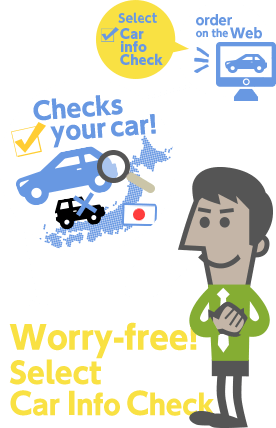
TCV, as the 3rd party between customers and sellers, checks your car before shipping.
No need of worrying about receiving a different car from what you paid for!
If the difference is found and you do not like that difference, you may cancel the transaction.
*Car Info Check is the check merely for accuracy of information online and does not guarantee the condition or function of the car.
Detailed report is available for
Car Info Check result!
We check your car in detail and compare each part with the actual car.
See below for the details being checked and be confident for the car you are purchasing!
| Check point | Example | Check content |
|---|---|---|
| Make/Model | Toyota / Land Cruiser Prado | No difference |
| VIN(Vehicle Identification Number) | VZJ120-0001676 | No difference |
| Displacement | 3,370 cc | No difference more or less than 51cc |
| Fuel | Gasoline | No difference |
| Exterior Color | Pearl | No difference |
| Transmission | Automatic | No difference |
| Mileage | 99,000 km | No difference more or less than 1,001km |
| Door | 5 | No difference |
| Steering | Right | No difference |
| Drive Type | 4wheel drive | No difference |
| Options | ABS / Driver Airbag / Passenger Airbag / Power Windows / A/C:front / Power Steering / Remote Keyless Entry / CD Player / Alloy Wheels / Power Mirrors / Sunroof | Presence or not of this option |
How to apply for Car Info Check
1. Press "Order Item" button and click "Next Step" to proceed the purchase.
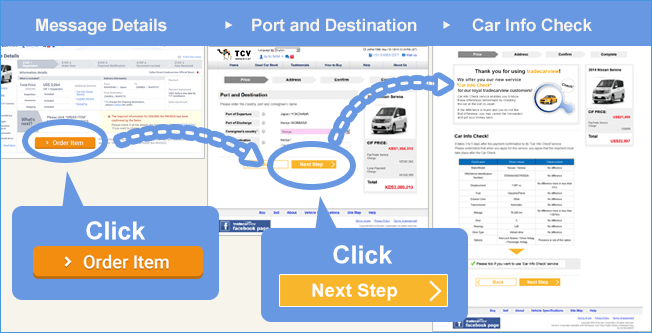
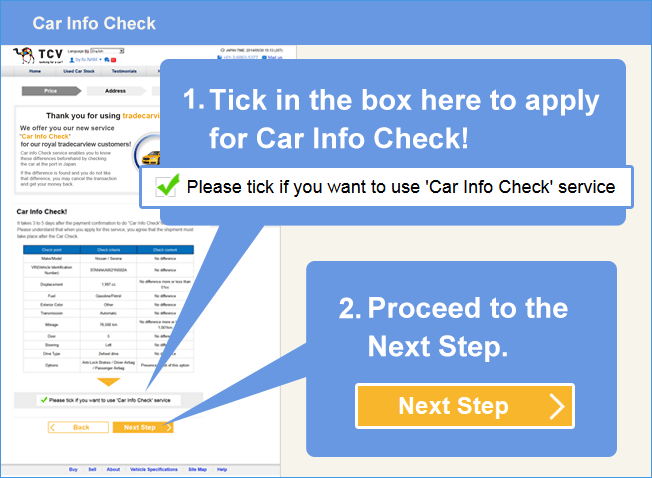
2. See bottom part of Proforma Invoice page (Order Item page).
FAQ
Read more FAQ about Car Info Check Service